Do you use Docfield without Single Sign-On (SSO)? If so, you can change your password yourself in your account settings. This guide only applies to users who sign in to Docfield directly with an email address and password.
Do you use Single Sign-On (SSO)?
Do you sign in through a Single Sign-On (SSO) solution, such as SurfConext or another authentication service provided by your organization? If so, your password is not managed within Docfield. In that case, please contact your organization's IT department or application administrator to change your password.
Change Password
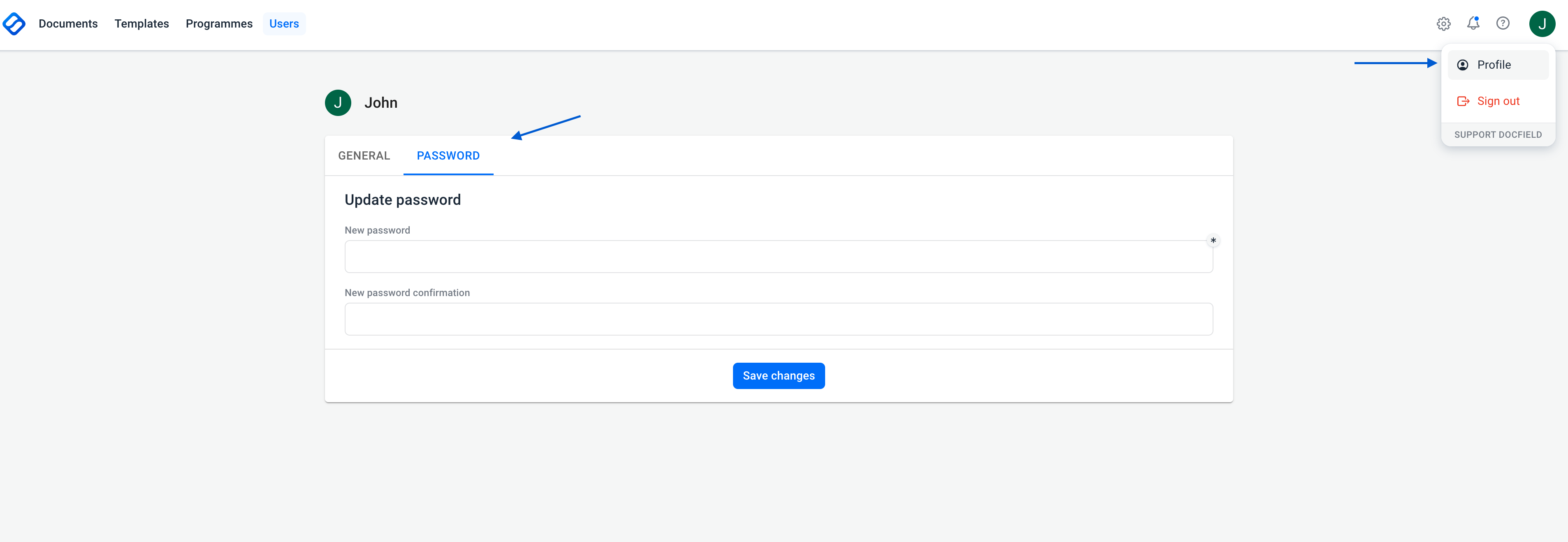
Follow the steps below to change your password:
- Click your profile in the top-right corner.
- Open your account settings.
- Go to the Password section.
- Enter your new password and confirm it.
- Click Save.
Was dit artikel nuttig?
Dat is fantastisch!
Hartelijk dank voor uw beoordeling
Sorry dat we u niet konden helpen
Hartelijk dank voor uw beoordeling
Feedback verzonden
We stellen uw moeite op prijs en zullen proberen het artikel te verbeteren